
CrawleeはWeb向けのスクレイピング・クローリングライブラリ。さくっとクローラーを作れてしまう。たくさんの似たようなページがあるサイト(楽天の商品ページとか)だと、全ページを開いてE2Eテストするのは大変なので、Crawleeをリンク切れチェッカーとか使えないものかと試してみた。
インストール
See: https://crawlee.dev/docs/quick-start
以下のコマンドでプロジェクトを作成する。
npx crawlee create my-crawler
上記コマンドを叩くと、CheerioCrawler、PlaywrightCrawler、PuppeteerCrawler。さらにJavascriptかTypescriptかを選べる。今回は今風にPlaywright + Typescript (PlaywrightCrawler template project [TypeScript])を選んだ。Playwrightを使っておけば、画面キャプチャなどE2Eでやりたいことが簡単にできる。
自動生成されたコードでポイントになるのが、src/main.ts と src/routes.ts 。
// main.ts
// For more information, see https://crawlee.dev/
import { PlaywrightCrawler, ProxyConfiguration } from 'crawlee';

import { router } from './routes.js';

const startUrls = ['https://crawlee.dev'];

const crawler = new PlaywrightCrawler({
    // proxyConfiguration: new ProxyConfiguration({ proxyUrls: ['...'] }),
    requestHandler: router,
    // Comment this option to scrape the full website.
    maxRequestsPerCrawl: 20,
});

await crawler.run(startUrls);
// routes.ts
import { createPlaywrightRouter } from 'crawlee';

export const router = createPlaywrightRouter();

router.addDefaultHandler(async ({ enqueueLinks, log }) => {
    log.info(`enqueueing new URLs`);
    await enqueueLinks({
        globs: ['https://crawlee.dev/**'],
        label: 'detail',
    });
});

router.addHandler('detail', async ({ request, page, log, pushData }) => {
    const title = await page.title();
    log.info(`${title}`, { url: request.loadedUrl });

    await pushData({
        url: request.loadedUrl,
        title,
    });
});
startUrlsとglobsをクローリングしたいURLに変更して、以下のコマンドを実行すればクローリングがはじまる。
cd my-crawler && npm start

> my-crawler@0.0.1 start
> npm run start:dev


> my-crawler@0.0.1 start:dev
> tsx src/main.ts

(node:54173) [DEP0040] DeprecationWarning: The `punycode` module is deprecated. Please use a userland alternative instead.
(Use `node --trace-deprecation ...` to show where the warning was created)
INFO  PlaywrightCrawler: Starting the crawler.
INFO  PlaywrightCrawler: enqueueing new URLs
INFO  PlaywrightCrawler: Crawlee {"url":"https://crawlee.dev/docs/examples"}
INFO  PlaywrightCrawler: Crawlee {"url":"https://crawlee.dev/api/core"}
INFO  PlaywrightCrawler: Quick Start | Crawlee {"url":"https://crawlee.dev/docs/quick-start"}
INFO  PlaywrightCrawler: Changelog | API | Crawlee {"url":"https://crawlee.dev/api/core/changelog"}
INFO  PlaywrightCrawler: Crawlee Blog - learn how to build better scrapers | Crawlee {"url":"https://crawlee.dev/blog"}
INFO  PlaywrightCrawler: Quick Start | Crawlee {"url":"https://crawlee.dev/docs/next/quick-start"}
INFO  PlaywrightCrawler: Crawlee {"url":"https://crawlee.dev/docs/3.9/quick-start"}
INFO  PlaywrightCrawler: Crawlee {"url":"https://crawlee.dev/docs/3.8/quick-start"}
INFO  PlaywrightCrawler: Quick Start | Crawlee {"url":"https://crawlee.dev/docs/3.7/quick-start"}
INFO  PlaywrightCrawler: Quick Start | Crawlee {"url":"https://crawlee.dev/docs/3.5/quick-start"}
INFO  PlaywrightCrawler: Quick Start | Crawlee {"url":"https://crawlee.dev/docs/3.6/quick-start"}
INFO  PlaywrightCrawler: Quick Start | Crawlee {"url":"https://crawlee.dev/docs/3.3/quick-start"}
INFO  PlaywrightCrawler: Crawlee {"url":"https://crawlee.dev/docs/3.4/quick-start"}
INFO  PlaywrightCrawler: Quick Start | Crawlee {"url":"https://crawlee.dev/docs/3.2/quick-start"}
INFO  PlaywrightCrawler: Quick Start | Crawlee {"url":"https://crawlee.dev/docs/3.1/quick-start"}
INFO  PlaywrightCrawler: Introduction | Crawlee {"url":"https://crawlee.dev/docs/introduction"}
INFO  PlaywrightCrawler: Crawlee {"url":"https://crawlee.dev/docs/guides/javascript-rendering"}
INFO  PlaywrightCrawler: Quick Start | Crawlee {"url":"https://crawlee.dev/docs/3.0/quick-start"}
INFO  PlaywrightCrawler: Crawlee {"url":"https://crawlee.dev/docs/guides/avoid-blocking"}
INFO  PlaywrightCrawler: Crawler reached the maxRequestsPerCrawl limit of 20 requests and will shut down soon. Requests that are in progress will be allowed to finish.
INFO  PlaywrightCrawler: TypeScript Projects | Crawlee {"url":"https://crawlee.dev/docs/guides/typescript-project"}
INFO  PlaywrightCrawler: CheerioCrawler guide | Crawlee {"url":"https://crawlee.dev/docs/guides/cheerio-crawler-guide"}
INFO  PlaywrightCrawler: Earlier, the crawler reached the maxRequestsPerCrawl limit of 20 requests and all requests that were in progress at that time have now finished. In total, the crawler processed 22 requests and will shut down.
INFO  PlaywrightCrawler: Final request statistics: {"requestsFinished":22,"requestsFailed":0,"retryHistogram":[22],"requestAvgFailedDurationMillis":null,"requestAvgFinishedDurationMillis":1018,"requestsFinishedPerMinute":103,"requestsFailedPerMinute":0,"requestTotalDurationMillis":22403,"requestsTotal":22,"crawlerRuntimeMillis":12834}
INFO  PlaywrightCrawler: Finished! Total 22 requests: 22 succeeded, 0 failed. {"terminal":true}
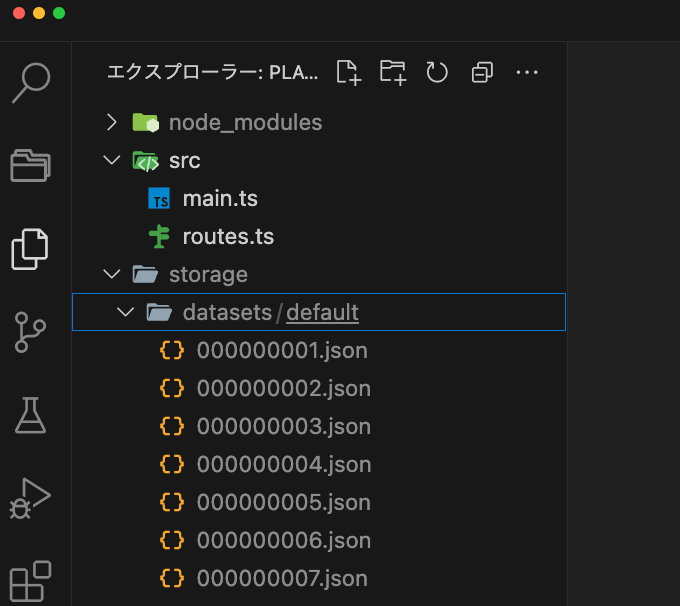
スクレイピングしたデータはdatasetsディレクトリに作成される。データは自分で加工も可能。
設定がたくさんある。気になったのをいくつか。
// main.ts
// headless modeで動かす場合
const crawler = new PlaywrightCrawler({
    ...
    launchContext: {
        // Here you can set options that are passed to the playwright .launch() function.
        launchOptions: {
            headless: true,
        },
    },
    ...
});
// routes.ts
// リンク先のドメインやサブドメイン判定はstrategyを使う。
// See: https://crawlee.dev/docs/examples/crawl-relative-links
router.addDefaultHandler(async ({ enqueueLinks, log }) => {
    ...
    await enqueueLinks({
        // domain settings
        strategy: EnqueueStrategy.All,
        ...
    });
});
指定したページから1階層だけリンクを辿らせられないか調べたけど無理そう。
Option to perform a depth first crawl #1595
ただ、サンプルを動かしてみると、指定したURLから1階層だけリンクをたどってくれている気がするので再帰的に無限でクローリングにはならない感じ。Crawl all links on a websiteを見る限り、 enqueueLinks()を指定すれば自動でそうなる模様。
その他のサンプルも Exampleにたくさんある。ドキュメントも充実している。
See: https://crawlee.dev/docs/examples
あとはリンク切れをチェックしたいけど、リンク先のステータスコードを取ってくる方法が見つからず。リンク切れだとページタイトルが「404 Not Found」とかになっているので、そこから抜き出すしかないのかしら。
 旅と子育てとアジャイルコーチのブログ「世界」