
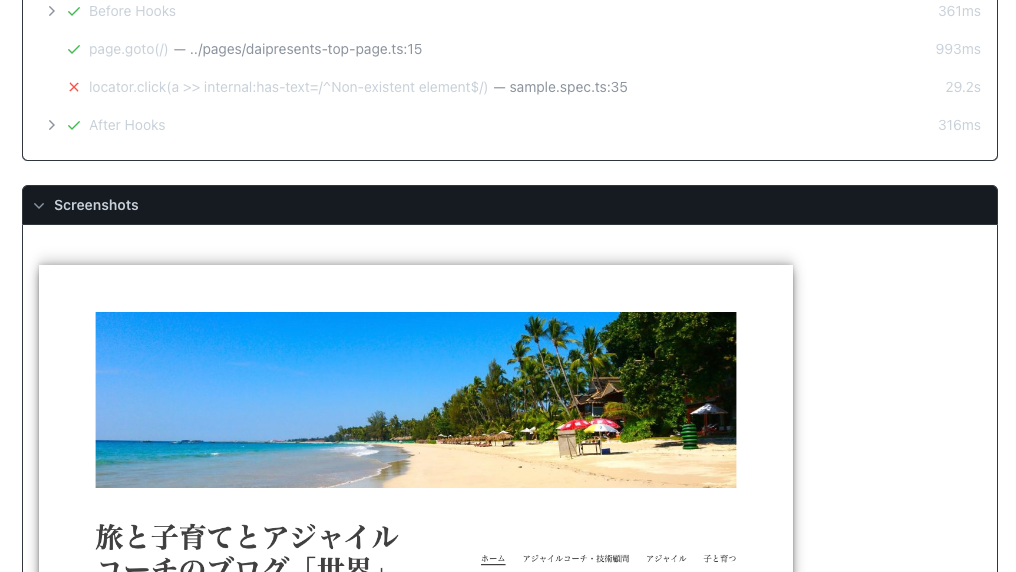
テストが失敗したときのデバッグに役立つスクリーンショット(いわゆるスクショ、画面キャプチャ)の取り方を調べる。
スクリーンショットを撮る
公式ドキュメント: Screenshots | Playwright
3種類の方法がある。画像は/test-results/${TEST_NAME}に保存される。
await page.screenshot({ path: 'screenshot.png' });

// full size
await page.screenshot({ path: 'screenshot-full.png', fullPage: true });

// Element
await page.locator('.header').screenshot({ path: 'screenshot-element.png' });
それぞれこんな感じ。


テストに失敗したとき撮る
テストで失敗したときに、そのときの状況が理解できなければ、デバッグができない。ログにも出るけど、WebのE2Eだとスクショが便利。
今回は、テストに失敗したときにパシャっと撮る方法を探してみる。世の中には同じことを考える人はだいたいいる。
先人の知恵: [Question] is there a way to take screenshots at the exact moment of the failure? #14854
今回はscreenshot.tsにテストに失敗したときにスクリーンショットを撮るスクショ撮影関数を作成する。サンプルはGitHubを参照のこと。
import {type TestInfo, type Page } from '@playwright/test';

export async function screenshotOnFailure({ page }: { page: Page }, testInfo: TestInfo) {
  if (testInfo.status !== testInfo.expectedStatus) {
    // Get a unique place for the screenshot.
    const screenshotPath = testInfo.outputPath(`./failure.png`);
    // Add it to the report.
    testInfo.attachments.push({ name: 'screenshot', path: screenshotPath, contentType: 'image/png' });
    // Take the screenshot itself.
    await page.screenshot({ path: screenshotPath });
  }
}
あとは、使うところで、.afterEachのHockに関数をいれる。
import { screenshotOnFailure } from '../lib/screenshot';
test.afterEach(screenshotOnFailure);
それぞれのテスト実行後にスクショ撮影関数が呼ばれ、ステータスが失敗ならスクショを撮る作戦。このあたりはRuby + RspecでE2E書いたときも似たようなことをした記憶がある。
 旅と子育てとアジャイルコーチのブログ「世界」